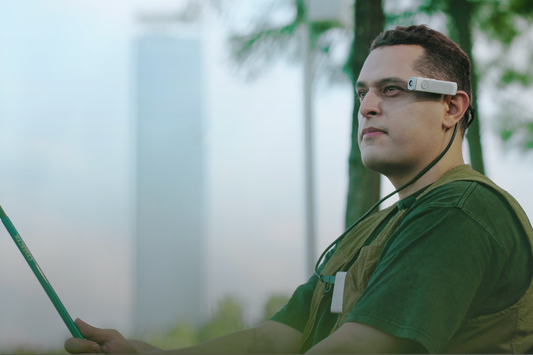
Does wearing a camera on your glasses feel heavy? (Spoiler: It’s 34g!).
Many U.S. shoppers wonder if a camera on glasses will feel heavy. AngelEye answers this with a simple number—34g ultra-lightweight. It's so light, it feels almost like nothing is there.

Lightness is key because glasses sit right where you feel every little thing. AngelEye is made to blend in, disappearing from your mind as you move. It aims to give you a seamless, hands-free camera experience.
Using a wearable camera changes how you capture life's quick moments. No more fumbling with your phone. With a hands-free camera, you're always ready to capture what's happening around you.
Why “heavy” is the first concern with a wearable camera on eyewear
When people ask if an eyewear camera feels heavy, they're not just talking about weight. They're concerned about balance, pressure, and how it feels when something is added. A camera that's light and doesn't feel like regular glasses is key.

What “heavy on your face” actually feels like during daily wear
“Heavy” can mean a pinched nose bridge, sore spots behind the ears, or feeling like it's sliding down. If it's heavy up front, you might feel a pull that makes you adjust your glasses more.
Wearing gear at eye level can be intense, even with small changes. One photographer said an electronic viewfinder felt like looking into a cube. It's all about how it feels at your eyes, where small changes can be big.
Why eye-level gear can be more noticeable than handheld cameras
Handheld cameras distribute weight, making it easier to rest between shots. But a camera on your face stays in contact with sensitive skin all the time. This is where fit is critical.
That's why people judge eyewear cameras more quickly than handheld ones. Your face takes the load, and even a small wobble can be distracting. It's hard to ignore when you're recording from your own perspective.
| Comfort factor | Handheld camera | Eyewear-mounted camera |
|---|---|---|
| Where the weight sits | Hands and arms; you can shift grip | Nose bridge and ears; fixed contact points |
| Breaks between clips | Easy to lower or set down | Stays on face unless you remove it |
| Balance sensitivity | Less sensitive to front-load | Front-loaded feel is immediate on the frame |
| Attention cost | Device is “in hand,” easy to notice | Always in view; comfort has to fade into the background |
How hands-free recording changes comfort expectations
Hands-free recording sets a higher standard for comfort. It promises you won't even notice the device. This shift changes what "comfortable enough" means.
For a camera to be daily wear, it must stay stable and feel natural. When it does, recording becomes effortless. It feels like living in the moment, not managing gear.
34g ultra-lightweight: what that means in real-world wear on glasses
Weight is the first thing you notice with any glasses-mounted camera. If it pulls down on the nose bridge, you feel it with every step. The 34g ultra-lightweight target is meant to cut that downward tug, reduce front-heaviness, and help your frames sit the way they normally do.
This is also the design logic behind AngelEye’s claim that it is engineered to be the world’s lightest FPV 4K camera. The goal is simple: an ultra-lightweight camera that can truly disappear in daily use, so the moment stays in front of you, not on your face.

How 32g supports an “invisible” eyewear camera experience
With a wearable pov camera, comfort is less about “can you wear it” and more about “do you forget it’s there.” At 32g ultra-lightweight, the clip is less likely to shift your frame angle or press hard on one side. That matters when you’re walking, talking, and turning your head to track real life.
Less weight often means less fidgeting. You spend less time nudging the temple arms back into place and more time staying present. That “invisible” feel is what makes a glasses-mounted camera practical for errands, commutes, and quick family moments.
Stability on the frame for eye-level filming and first-person perspective
Eye-level filming is unforgiving. A tiny slip can show up as a bounce, a tilt, or a horizon that won’t stay level. A lighter ultra-lightweight camera can reduce micro-slips at the clip point, which helps keep footage calmer when you take steps or nod during a conversation.
This is important for first-person perspective clips. When the camera sits steady on the frame, the scene feels natural, not shaky or “helmet-cam” harsh. For a wearable pov camera, that steadiness can be the difference between a clip you keep and one you delete.
| Real-world moment | What heavy gear often causes | How 32g ultra-lightweight changes the feel | Why it matters for eye-level filming |
|---|---|---|---|
| Normal walking on sidewalks | Front bounce and frequent readjustments | Less downward pull and reduced frame wobble | Smoother first-person perspective with fewer jolts |
| Turning your head to look at traffic | Clip twist and slight angle drift | More stable contact on the frame with less torque | Cleaner pans that feel like natural vision |
| Talking with friends | Nose bridge pressure and subtle slipping | Lower pressure build-up over short bursts | More usable audio-visual moments without fuss |
| Quick indoor-to-outdoor move | Unbalanced frames that sit crooked | Better balance for a glasses-mounted camera on daily eyewear | Less horizon tilt when the light changes fast |
What to expect during longer sessions (endurance in minutes)
For a glasses-mounted camera, endurance is best understood as session-based capture, measured in minutes. It’s built for short bursts, repeat clips, and fast starts, not all-day continuous recording. That matches how people really use hands-free gear when something unexpected happens.
A common real-life pattern is a quick tap or hold to grab a short video, often around a default 1 minute clip. In practice, that cadence fits an ultra-lightweight camera well: record, stop, then jump back into the moment. It keeps the wearable pov camera feeling light and simple while covering the highlights you’d miss.
AngelEye’s origin story: capturing meaningful moments without constant attention
AngelEye was created with the idea that the most meaningful moments happen when your hands and mind are free. This idea guided every early choice, from its design on eyewear to how it starts recording. It's meant to be a quiet, trusted camera, not a gadget to manage.
Usually, capturing moments involves a routine: waking the phone, opening the camera, framing, hitting record, and then putting it away. This cycle takes your focus away, turning a moment into a screen-check. AngelEye's wearable camera aims to lessen this mental load, making hands-free recording fit into your daily activities.
Born from the belief that the best moments happen when your hands and mind are free
When you focus on the people in front of you, memories feel fuller. AngelEye uses a first-person view to match how you naturally look around. It prioritizes being present over capturing footage.
This is where the "your eye is the camera" feeling is key. A point-of-view camera at eye level captures what you notice, in the order you notice it. This makes the story feel less staged and more like real life.
Moving away from cameras that demand constant attention
Traditional cameras require constant choices: holding steady, re-framing, checking lighting, and confirming the clip saved. Even quick clips can add up to a lot of thinking. A hands-free camera removes these interruptions, keeping your mind in the moment.
This shift changes what "easy to use" means. With hands-free recording, the best control is the one that doesn't interrupt your activities. It's designed to keep your attention forward, not down.
Design goal: a natural, intuitive way of capturing life through a point-of-view camera
The origin story is reflected in the engineering: making the device 32g, stable, and quick to use. Weight and balance aren't just specs; they support a wearable camera that doesn't tug at your focus. The result is a first-person perspective that feels natural during everyday movement.
| Everyday capture moment | Screen-led routine that breaks presence | AngelEye POV approach that supports presence |
|---|---|---|
| Greeting friends at a party | Pull phone out, open camera, raise screen between faces, reframe, then put it away | Hands-free camera stays at eye level so you keep eye contact while capturing a point-of-view camera angle |
| Walking a dog or pushing a stroller | One hand holds the phone, the other manages leash or handle; frequent stops to check the screen | Hands-free recording keeps both hands available while the wearable camera maintains a steady first-person perspective |
| Cooking or weekend projects | Touch phone with messy hands, reposition it, confirm framing, repeat after each step | Point-of-view camera captures what you see without pausing the task, reducing repeated adjustments |
| Travel and quick street moments | Reach, unlock, aim, and risk missing the moment while people move on | Wearable camera is ready when you are, keeping the moment intact without extra steps |
Glasses-mounted camera, Ultra-lightweight Wearable POV camera
A Glasses-mounted camera is a small clip-on system that sits at eye level and records what you see. An Ultra-lightweight Wearable POV camera does the same job but is lighter and doesn't pull on your frames.
What “wearable pov camera” means for hands-free recording
A wearable pov camera captures video without you reaching for a device. This means you can stay focused on the moment while recording happens in the background. It's a big deal because it keeps your attention on what's happening.
It's also great for quick situations where you don't want to lose a moment. Using a pov camera feels more like a tool than a task.
Why eye-level filming creates more immersive point-of-view camera footage
Eye-level filming looks natural because it matches how people expect first-person video to feel. A point-of-view camera keeps the view close to how your eyes see things. This makes it easier for viewers to follow what you're seeing.
But, what you wear can affect the view. For example, a baseball cap brim can block part of the lens. So, how you dress can change your camera shot.
When a lightweight wearable camera is more practical than pulling out a phone
A lightweight wearable camera is useful when your hands are busy or you're moving at a steady pace. With a phone, you often need to grab it, wake it, open the camera, and use the screen as a viewfinder. This can take a few steps.
With a wearable setup, you can stay present and keep both hands free. This way, you can capture the moment without distraction.
| Everyday situation | Phone recording friction | Wearable approach | Real-world watch-out |
|---|---|---|---|
| Walking the dog or carrying groceries | One hand is tied up; the screen pulls your focus | Wearable pov camera keeps the view steady at eye level | Adjust the clip so the lens isn’t tilted up or down |
| Quick kid moments at home | Unlocking and framing can miss the first seconds | Point-of-view camera captures the moment as it starts | Check lighting; indoor scenes can look dim on any small camera |
| On the move in a city or at an event | Holding a phone can feel awkward and attracts attention | Glasses-mounted camera records with less handling and fewer pauses | Hat brims and thick frames can intrude into the shot |
| DIY tasks and cooking | Hands get messy; stopping to reframe breaks flow | pov camera shows what you’re looking at while you work | Steam, splatter, or fingerprints can haze the lens |
AngelEye 4K camera specs that impact comfort, balance, and usability
Wearing tech should feel natural. The angeleye 4k camera is designed for daily use. It supports natural posture and easy framing.
Weight and build: 34g, PC+ABS material
The camera is very light, weighing just 32g. This makes it comfortable to wear without feeling heavy.
The PC+ABS material is tough. It's perfect for everyday use. The camera can withstand being set down, picked up, and packed away often.
Field of view: 114° camera FOV for POV coverage
A wide view means you don't have to adjust your head as much. The 114° camera FOV captures more of what's in front of you.
This is great for POV coverage. It makes scenes feel more real. It's also useful when you can't spare a hand to reframe.
Video formats: 4K 30fps and 1080 60fps for smooth first-person perspective
Video format affects how footage looks during normal motion. 4K 30fps keeps detail sharp in scenes with depth.
For scenes with lots of movement, 1080 60fps is smoother. This makes everyday clips more enjoyable to watch later.
Photo formats: 8000×6000, 4000×3000, 3840×2160
Photos are quick and easy to capture with the angeleye 4k camera. It supports 8000×6000, 4000×3000, 3840×2160 for fast snapshots.
With 64GB / 128G options, you can keep recording and snapping. “Endurance: Minutes” matches how people use wearable POV clips—short and frequent.
| Comfort-focused spec | What it changes during wear | Everyday use case |
|---|---|---|
| 34g + PC+ABS material | Helps maintain balance on the frame and supports durability in routine handling | Clip on and forget it during errands, commuting, and quick stops |
| 114° camera FOV | Reduces the need to re-aim for a natural first-person view | Captures more of a scene in front of you during walks or conversations |
| 4K 30fps | Prioritizes detail for eye-level footage where small elements matter | Clear POV clips in well-lit settings like parks, streets, and events |
| 1080 60fps | Prioritizes smoother motion for head turns and steps | Better-feeling movement in casual daily recording |
| 64GB / 128G + Endurance: Minutes | Supports more short sessions before offloading and fits quick-capture habits | Repeat moments: short clips, fast photos, and on-the-go highlights |
Anti-shake for eye-level filming: ois+eis+ai anti-shake explained
When a clip starts fast, how stable it feels matters a lot. Eye-level filming can show tiny movements as jitter, even in short clips. That's why AngelEye uses an ois+eis+ai anti-shake system for real movement, not just staged shots.
Why glasses movement is different from handheld shake
A camera on glasses moves with your body, not your hands. This means head turns, nods, and walking can cause small movements. These movements are right in the center of the frame, making them seem bigger.
Recording with a hands-free camera is common. People record while walking, scanning shelves, or talking. You want the video to be smooth and easy to watch, without worrying about holding steady.
How OIS supports steadier footage during walking and everyday motion
OIS, or optical stabilization, helps with small, fast movements. This is key for eye-level filming because the camera moves with you. Even when you feel steady, it's always moving.
With a wearable camera, OIS helps you relax your head position. This makes recording hands-free feel more natural. You can walk down a hallway or turn to look at something without worrying about the camera.
How EIS and an AI algorithm help refine stability for a wearable camera
EIS, or electronic stabilization, smooths out movement between frames. This makes the video easier to follow. For first-person footage, EIS reduces the "floating" wobble that can happen during longer clips.
An AI algorithm then fine-tunes the footage. Wearable cameras capture patterns like step rhythm and head swivel. The AI layer corrects these patterns, making the footage look smoother without you thinking about it.
| Stabilization layer | What it targets in eye-level filming | What you notice in first-person perspective | Why it helps hands-free camera use |
|---|---|---|---|
| OIS | Optical jitter and motion blur from steps and quick head motion | Sharper details with fewer tiny jolts during walking | Less need to “brace” your body while recording |
| EIS | Frame-to-frame shifts and bounce patterns during movement | Smoother scene flow that’s easier to watch | More usable clips when you start recording fast |
| AI algorithm | Residual shake patterns common to a wearable camera on glasses | More consistent stability across quick turns and nods | Less mental effort to keep footage steady while staying present |
Comfort and fit factors beyond weight for a hands-free camera on spectacles
Even a light device can feel wrong if it doesn't fit right. A camera on glasses should feel like it's not there. It should fit your face perfectly, not rub against it.
Clip-on feel and pressure points on different frames
How tight the clip is matters a lot. A stiff frame spreads pressure, while a soft one might pinch. The shape of the nose pads and temple grip also affect how it feels.
Small changes near the eyes can cause big problems. If you're sensitive to eye relief, even a tiny tilt can be annoying. It's like a loose dial on a head-worn camera that you can't ignore.
How eyewear geometry can affect alignment
The shape of your glasses affects what the camera sees. The frame's wrap, lens height, and bridge position can change the view. You want the camera to show what you naturally see.
Things outside your vision can block the camera. A baseball cap brim can cover the lens, sometimes giving a "camera is blocked" warning. It's like the camera is part of your outfit, affected by everything you wear.
Practical tips to reduce noticeable front-heaviness during longer wear
- Center the clip and lock it in place to prevent tilt and reduce pressure hotspots; a stable mount helps a lightweight wearable camera feel lighter.
- Use a snug (not tight) everyday frame fit to cut micro-slips while walking, which keeps the point-of-view camera aligned without constant nudges.
- If you wear a cap, set the brim higher or slightly back so it doesn’t intrude into the lens area of the glasses-mounted camera.
- Record in shorter bursts that match endurance-in-minutes sessions, which reduces the slow build of front-loaded sensation over time.
| Fit factor | What you feel during wear | What it changes in footage | Quick adjustment that helps |
|---|---|---|---|
| Clip pressure and contact area | Pinch on the bridge or a single sore spot | Micro-tilt and small horizon drift | Re-center the clip and ensure even contact on the frame |
| Frame rigidity | Either steady comfort or “springy” bounce | More shake or subtle wobble in motion | Use a sturdier daily frame fit to limit flex |
| Temple grip and ear pressure | Sliding forward, or tightness behind the ears | View shifts down as the frame creeps | Adjust temple fit so it’s snug and consistent across steps |
| Nose pad design and bridge fit | Pressure on the nose or frequent re-seating | Framing changes each time you push the glasses up | Set pads for stable contact so the eyewear camera stays level |
| Hat brim and clothing interference | Nothing obvious until a warning or missed shot | Top-edge obstruction in the recording | Move the brim back so the lens line stays clear |
What you can realistically capture with an ultra-lightweight camera in everyday life
An ultra-lightweight camera is perfect for capturing life as it unfolds. With AngelEye, you get hands-free recording that captures moments instantly. It's all about quick, natural shots, not posed ones.
Using a wearable POV camera is great when your phone gets in the way. It's perfect for recording a walk with your dog, a kid's skateboarding, or a busy kitchen. It's also handy for capturing a commute where you can't hold your phone.
Remember, this camera is for quick moments, not for replacing your phone or a full camera setup. It's about staying in the moment and capturing what you'd miss.
AngelEye's design makes it easy to wear and forget about. It has a wide 114° view and records in 4K or 1080p. Plus, it offers high-res photos and has 64GB/128G storage with stabilization for smooth recording.
FAQ
Will it feel heavy on my face?
Many U.S. shoppers worry about this. AngelEye weighs 32g. It's made to feel like it disappears when clipped onto your glasses. This way, you can stay focused while capturing what you see.
What does “heavy on your face” actually mean with a glasses-mounted camera?
It's not just about the weight. It's about how it feels on your face and balance. It can cause pressure on the nose bridge, behind the ears, or a front-loaded pull when it sits forward on a frame.
Why do small changes at eye level feel so noticeable when you wear glasses?
Glasses wearers notice tiny fit changes more because the contact points are always there. Some camera EVFs can feel like “looking into a cube,” with the viewfinder “buried deep” and the image feeling “a couple of centimeters away.” This is why eyewear comfort is judged quickly with any eyewear camera.
Why can eye-level gear feel more noticeable than handheld cameras?
Handheld cameras distribute weight to your hands and arms. A glasses-mounted camera sits on the nose and ears—more sensitive areas. Even small imbalances can feel bigger in daily wear.
How does hands-free recording change comfort expectations?
Hands-free recording sets a new standard. It should feel like you’re “always wearing it… kind of never wearing it.” If you have to think about the device, adjust it constantly, or hesitate to move normally, it doesn’t match the promise of a true hands-free camera.
How does a wearable camera reduce the “phone fumble” in real life?
A phone often means: take it out, wake it, open the camera, frame through the screen, shoot, and put it away. A wearable POV camera cuts those steps, so quick moments are easier to capture without turning life into a screen-viewing routine.
What does 34g ultra-lightweight mean for daily wear on glasses?
At 34g ultra-lightweight, AngelEye is less likely to pull frames downward, create front-heaviness, or trigger constant readjustment when you’re walking, turning your head, or talking. That’s the point of an ultra-lightweight camera built for eyewear.
Is AngelEye designed to be the world’s lightest FPV 4K camera?
Yes. AngelEye is engineered to be the world’s lightest FPV 4K camera, designed to “truly disappear” when clipped on. The weight isn’t a gimmick—it’s the core usability goal for eye-level filming.
Does a lighter eyewear camera help with steadier POV footage?
Often, yes. A lighter device can reduce micro-slips and bounce that create distracting motion at eye level. Less front weight can mean fewer tiny shifts that show up in first-person perspective video.
What does “Endurance: Minutes” mean for an eyewear camera?
It’s best understood as session-based capture. This category is built for short bursts and repeat clips—like quick videos many people default to (often around a minute)—instead of all-day continuous recording. It aligns with how hands-free recording is used for spontaneous moments.
What’s the brand idea behind AngelEye?
AngelEye was born from the belief that the most meaningful moments happen when your hands and mind are free. That philosophy drove the engineering choices: 32g, intuitive controls, and a design meant to feel invisible in everyday life.
Why is “not touching a phone” such a big deal for capturing moments?
Because the phone routine pulls attention away: wake, open, frame through a screen, capture, pocket. A point-of-view camera supports a more natural presence—your eye is the camera—so you can stay in the moment while getting the shot.
What is a glasses-mounted camera in plain terms?
A glasses-mounted camera is a clip-on, eye-level POV system designed for hands-free recording. It captures what you see without holding a device, which is why many people call it a pov camera or wearable camera.
Why does eye-level filming feel more immersive than other angles?
Eye-level filming matches the vantage point your audience expects in first-person perspective content. That alignment helps clips feel more natural and “you are there,” which is a key reason people choose a wearable camera for POV storytelling.
When is a lightweight wearable camera more practical than pulling out a phone?
It’s ideal for quick moments, moving situations, or anytime your hands are occupied. A lightweight wearable camera can capture instantly without the extra steps of framing through a screen.
Can hats or a baseball cap affect an eyewear camera view?
Yes. A cap brim can block the lens at eye level and may trigger a “camera is blocked” warning on some devices. With any eyewear camera, your wear habits matter—specifically brim placement during eye-level filming.
What materials and build choices support comfort on spectacles?
AngelEye combines a 34g design with durable PC+ABS material. For a clip-on hands-free camera on spectacles, that balance supports a lighter on-face feel while holding up to daily use.
What does a 114° field of view mean for POV coverage?
AngelEye’s 114° camera FOV captures a wider slice of what’s in front of you. That’s helpful for POV because you don’t need to constantly reframe, and the footage feels more like what you actually saw.
What video formats does the AngelEye 4K camera support, and why do they matter at eye level?
It records 4K 30fps for detail and 1080 60fps for smoother motion. At eye level, walking and head turns introduce movement, so having a smoother option helps everyday footage look more watchable.
What photo formats are supported for hands-free snapshots?
AngelEye supports 8000×6000, 4000×3000, 3840×2160. These options make it easy to grab quick photos without pulling out your phone, matching the point of a hands-free recording workflow.
What storage options are available?
AngelEye offers 64GB / 128G storage options. Storage matters for a wearable pov camera because it affects how many short clips and snapshots you can capture before you need to offload.
Why does movement look different on a glasses-mounted POV camera than on a handheld camera?
Glasses amplify micro-movements—head turns, nods, and walking bounce—because the camera is attached to your natural motion at eye level. That’s why stabilization and fit are critical for a glasses-mounted camera.
What does “OIS+EIS+AI anti-shake” mean?
It’s a stabilization stack designed for wearable capture: OIS helps reduce motion blur and step jitter, EIS smooths frame-to-frame movement, and an AI algorithm refines the result to reduce shake patterns common in eye-level filming.
How does stabilization improve comfort, not just video quality?
Better stabilization can reduce the urge to “over-control” your posture. When footage stays steadier naturally, hands-free recording feels more relaxed and less mentally demanding.
Is comfort only about weight, or does frame fit matter too?
Frame fit matters a lot. Clip pressure, frame rigidity, temple fit, and nose pad design all change perceived weight and stability. Even small shifts can become big annoyances at the face—similar to how glasses wearers notice tiny eye-relief issues or have to re-adjust controls that are too loose.
What should I look for if I want the best camera for spectacles?
Look for a lightweight wearable camera that stays balanced, clips securely, and doesn’t create pressure hotspots on your nose or behind your ears. For a best camera for spectacles fit, stable alignment and minimal front-heaviness often matter as much as raw specs.
How can eyewear geometry affect alignment and framing?
Eyewear geometry changes horizon level and where the lens points. If the clip sits off-center or the frame tilts, your POV can look slanted. Obstructions—like a cap brim—can also interfere, so alignment checks are part of normal point-of-view camera use.
What practical tips help reduce front-heaviness during longer wear?
Center the clip and secure it to prevent tilt and pressure hotspots. Use a stable, everyday frame fit—snug but not tight—to reduce micro-slips while walking. If you wear a cap, watch brim placement to avoid blocking the lens during eye-level filming. Also, use shorter capture bursts to match endurance-in-minutes sessions.
What can I realistically capture with an ultra-lightweight, hands-free camera?
Expect authentic, in-the-moment POV: quick photos and short videos that reflect what you actually saw. It’s great for spontaneous moments, personal projects, and moving situations where a phone would slow you down, while keeping you present instead of glued to a screen.